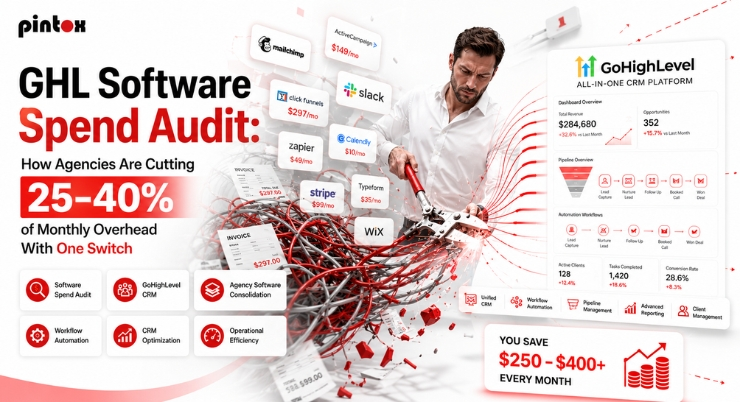
If you run an agency, your software stack can quietly crush margins. It happens one tool at a time. A new client needs a new feature. A team member adds “just one more” subscription. Then your monthly overhead balloons.
A spend audit fixes that fast. You find overlap, waste, and hidden fees. Then you consolidate with a cleaner system.
Want a quick reality check on your stack? Use the SaaS Cost Calculator and get your monthly number in minutes.
If your software costs surprise you, it’s time for an audit.
The “Software Spend Audit” Agencies Actually Need (and why it’s not just bookkeeping)
A software spend audit is not an accounting exercise. It is a profitable move. It shows you what you pay for, and what you really use.
Most agencies track revenue well. They often ignore software creep. That creep becomes a margin leak.
What a software spend audit looks like in a real agency P&L
Start with every recurring tool. List monthly cost, seats, and usage fees. Then tie each tool to a business outcome. Examples include lead capture, follow-up, and reporting.
Next, mark tools as one of these:
- Essential: Used weekly and tied to revenue.
- Replaceable: Good, but duplicated elsewhere.
- Unused: Paid, but rarely opened.
- Risky: Critical, but poorly configured.
You now have a clear-cut list. You also have a clearer build plan.
The difference between a spend audit and a software audit defense
A spend audit reduces overhead. Software audit defense is different. That is about licensing compliance and vendor audits. Both matter, but they solve different problems.
If you want lean operations, focus on spend first. Then clean up contracts and compliance.
Why “tool sprawl” breaks delivery speed and reporting clarity
Tool sprawl slows everything. Data lives in five places. Attribution becomes guesswork. Your team spends time moving information around.
That also hurts client trust. Clients want clean answers. They want simple metrics and clear ROI. Disconnected tools make that harder.
If you cannot explain ROI, your stack is not helping.
Why GHL Software Consolidation Cuts 25-40% of Overhead
Most agencies do not need twelve subscriptions. They need a connected system. One login. One pipeline. One reporting view.
That is where consolidation wins. It lowers costs and improves execution.
What agencies replace when they switch to one platform
In many stacks, you pay for these separately:
- CRM
- Email marketing
- SMS
- Automation
- Funnels and landing pages
- Calendar and booking
- Pipeline tracking
- Basic reporting
A consolidated setup can replace many of those. That is the appeal of GoHighLevel software for agencies. It is also why people call it ghl crm software. It functions as a full gohighlevel crm system.
You might keep a few specialist marketing tools. That is normal. The goal is fewer subscriptions with stronger outcomes.
Quick GoHighLevel marketing software overview
Here is a simple GoHighLevel marketing software overview.
- You get a CRM, automation, and messaging tools.
- You can manage pipelines and conversations.
- You can build landing pages and funnels.
- You can create calendars and booking flows.
- You can track results with built-in reporting.
The real value is integration. Everything talks to everything else.
Where savings really come from (the “big 3” cost leaks)
Savings usually come from three places:
- Duplicate tools doing the same job
- Per-seat pricing that grows every quarter
- Hidden usage fees and add-ons
Most agencies also pay a “switching tax.” That is time, confusion, and setup effort. A good plan reduces that tax.
If six tools cover one workflow, consolidation pays you back.
Your Agency SaaS Stack vs. One Platform
Many agencies guess their “true software cost.” They forget seats, upgrades, and usage charges. A simple table makes the gap obvious.
“Before vs After” monthly tool spend (example categories)
Category | Typical “Stack” Tools | Typical Monthly Cost | Consolidated Option | Typical Monthly Cost | Notes |
| CRM | Separate CRM platform | $100–$500+ | One CRM | Included | Seat costs add up fast |
| Email platform | $50–$300+ | Built-in email | Included | Costs rise with lists | |
| SMS | SMS tool | $50–$300+ | Built-in SMS | Usage-based | Depends on volume |
Automation | Automation tool | $50–$400+ | Workflows | Included | Replace most zaps |
| Funnels | Funnel builder | $50–$300+ | Funnels/pages | Included | Fewer plugins needed |
Booking | Scheduling tool | $20–$50+ | Calendar | Included | Better handoffs |
| Reporting | Dashboard tool | $50–$400+ | Reporting | Included | Depends on needs |
These numbers vary by agency size. The point is the pattern. Separate tools create stacked costs. A consolidated system lowers the base.
How to calculate savings correctly (don’t ignore usage-based fees)
Do not ignore usage fees. They can hide inside “cheap” tools. Check these items:
- SMS volume
- Email volume
- Call minutes
- Extra sub-accounts or locations
- Additional domains
- Add-on reporting modules
Then attach savings to a real business number. That is a measurable dollar value. It makes the decision easier.
Want a clean “before vs after” map for your stack? Book an audit call.
Step-by-Step: How to Run a GHL Spend Audit Without Missing Anything
This process keeps your agency stable. It also avoids breaking client systems. Use it even if you do not switch.
Step 1 – Inventory every tool and tie it to an outcome
Make a list of every subscription. Include monthly cost and yearly renewals. Write the tool’s job in one sentence. Then note the KPI it impacts.
Examples of outcomes:
- More leads
- Faster follow-up
- Higher booked appointment rate
- Higher close rate
- Cleaner reporting
If a tool has no outcome, it is a red flag.
Step 2 – Identify overlap and consolidate by workflow
Think in workflows, not tools. Use this order: lead, nurture, book, close. Now mark which tools touch each step.
- Overlap shows up fast.
- Two email tools.
- Two automations.
- Three calendars.
- Four reporting views.
Consolidation lets you optimize workflows. It also improves system ROI.
Step 3 – Score each tool by usage, impact, and replacement difficulty
Use a simple score. Keep it quick and honest.
Scoring rubric:
- Usage: daily, weekly, monthly, never
- Impact: high, medium, low
- Replacement: easy, moderate, hard
Cut the “never + low impact” tools first. Then consolidate duplicates.
Step 4 – Set a cut plan and timeline (30/60/90 days)
Avoid ripping everything out at once. That causes chaos. Instead, use a staged plan.
- 30 days: consolidate lead capture and follow-up.
- 60 days: consolidate pipeline and reporting.
- 90 days: refine automations and remove leftovers.
This protects deliverability and tracking. It also keeps client outcomes steady.
A good audit produces a cut list and a roadmap. It also prevents a messy rebuild.
Want a prioritized cut list and migration plan? Book a spend audit roadmap.
Proving ROI After You Consolidate: Reporting, Pipeline, and Ad Efficiency
Cutting costs is only step one. You also need visibility. Better visibility improves decisions. That is how you grow profitably.
Set up a clean reporting dashboard to prove ROI
Use a single source of truth. That is the whole point. Build a reporting dashboard your team trusts.
Here are the reporting terms that matter:
- GHL reporting and analytics
- GoHighLevel reporting
- GHL built-in reporting
- analytics dashboard
- custom dashboards
- custom reports
Your dashboard should show:
- Lead volume and lead source
- Response time
- Booking rate
- Close rate
- Revenue by campaign
If you can prove ROI, retention improves. Clients stay when results feel real.
Tie spend to revenue using pipeline metrics and sales pipeline visibility
Your sales pipeline is your forecast. Use pipeline metrics to keep it honest.
Track these regularly:
- pipeline value by stage
- Stage-to-stage conversion
- pipeline bottlenecks and drop-offs
- total revenue closed each month
- A simple financial forecast
This creates a predictable revenue engine. It also reduces stress during slow weeks.
Improve ad decision-making fast
Ads waste money when tracking is unclear. That is common. So teams keep funding poor-performing ads. Clean measurement fixes that.
Track:
- Ad performance by offer and audience
- Ad spend per campaign
- Cost per lead
- Cost per appointment shows
- Conversion metrics from lead to booked call
- Cost per sale
If numbers look off, find performance bottlenecks. It might be a slow follow-up. It might be weak nurturing. It might be broken automation.
A cheaper stack helps. A measurable stack drives profit.
Implementation Details Agencies Ask About (Support, API, and Marketplace)
Agencies usually ask three practical questions. Support, integration, and add-ons matter. They also affect long-term simplicity.
Where gohighlevel support fits (and when you need expert setup)
Gohighlevel support helps with platform questions. It does not run your build for you. Docs explain features and settings. Implementation requires planning and testing.
If you want speed and stability, use a clear build plan. That keeps client delivery smooth.
When the gohighlevel api matters
Most agencies never touch code. That is fine. Still, the gohighlevel api matters for advanced needs.
Common API use cases include:
- Custom data sync with internal systems
- Advanced reporting exports
- Special routing rules
- Unique lead sources
You do not need complexity on day one. Use it only when it adds real value.
Using the GoHighLevel marketplace without rebuilding a tool stack
The GoHighLevel marketplace offers add-ons. That can be helpful. It can also restart tool sprawl. Add only what improves outcomes. Avoid add-ons that duplicate core features. Keep the system clean.
Want a clean build that stays simple? Get a guided setup.
FAQ’s
What Is A GHL Software Spend Audit?
It is a structured review of your agency’s subscriptions. You list tools, costs, and usage. Then you map each tool to a workflow and KPI. The output is a cut list and consolidation plan.
How Can GoHighLevel Reduce Monthly Software Costs?
It can replace several tools with one connected platform. You reduce duplicate subscriptions. You also reduce seat-based GoHighLevel pricing creep. You spend less time moving data between systems.
Which Software Tools Can GHL Replace For Agencies?
It often replaces CRM, email, SMS, and automation tools. It can also replace funnels, booking, and basic reporting tools. Exact replacement depends on your agency model.
How Much Can Agencies Save By Switching To GoHighLevel?
Savings vary by stack size and seat counts. Many agencies see meaningful reductions after consolidation. The best way to know is a real audit. Use your current invoices and compare line by line.
Is GoHighLevel Cheaper Than Using Separate CRM, Email, SMS, And Automation Tools?
In many cases, yes. Separate tools usually stack costs. They also create integration and reporting gaps. A single platform often reduces complexity and base spend.
Closing: The One-Switch Overhead Cut
You do not need more tools. You need fewer tools that work together. A spend audit shows the fastest path. Book a GHL spend audit and get a cut list plus a migration roadmap, or learn more about Pintox GHL services.