Missed calls cost you jobs. They also cost trust. Most homeowners call two or three companies. They book whoever answers first.
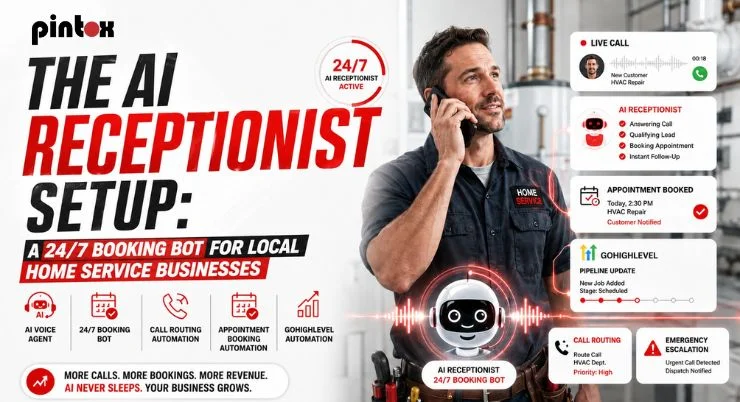
An AI booking bot can fix that. It answers inbound phone calls 24/7. It captures details. It can schedule appointments and protect your team’s time.
Want this installed end-to-end? Book a free setup consult, and we’ll map your call flow in 15 minutes.
Why Local Home Service Businesses Keep Losing Bookings After Hours
Most calls happen when techs are busy. Many calls also hit after-hours calls. That includes weekends and holiday closures.
Voicemail feels like a dead end. Unanswered inquiries turn into lost customers fast. That becomes lost revenue you never see.
A strong AI reception system does one thing well. It turns calls into booked work. It also creates captured opportunities you can track later.
AI Receptionist Setup: The Practical System That Books Jobs 24/7
This is not “set it and forget it.” It is a simple operating system for calls. It includes automation, rules, and a human backstop.
You are building a full AI receptionist solution. You are not chasing another shiny tool.
What You’re Actually Building (Not “Another Tool”)
Think of it like a modern front desk. It handles call answering and routing first. It then moves to appointment booking.
It includes an AI phone agent for conversations. It uses booking software to confirm times. It relies on workflow automation for follow-up.
This is an AI reception system, not a chatbot gimmick. It also becomes your AI receptionist system over time. You improve it using call transcripts and simple QA.
What an “AI Reception” Experience Should Feel Like for Callers
Homeowners want speed and clarity. They do not want a phone maze.
Your AI reception should feel polite and fast. It should confirm service areas early. It should respect business hours and operating hours.
It should handle live availability when possible. It should also explain the next steps. That includes who arrives and when.
Want our plug-and-play call-flow checklist? Grab it after you book a quick call.
Why a 24/7 Booking Bot Beats Voicemail (And Usually Beats Live Answering)
A 24/7 booking bot never calls in sick. It also stays consistent at 7:00 p.m. That consistency improves the customer experience.
It can also reduce missed calls. It can route emergencies correctly. It can calm the rush when call volume spikes.
The Real Cost of Missed Calls in Home Services
Every missed call has a price, and some are small jobs while others are high-ticket installs. Speed matters more than most owners think, and AI-led response time often decides who wins the job.
Options Compared (Voicemail vs Live Receptionist vs AI Voice Booking)
Option | Coverage | Data capture | Consistency | Escalation triggers | Typical monthly cost | Best for |
| Voicemail | Limited | Weak | Low | None | Low | Very low call volume |
Live answering | Business hours | Medium | Medium | Manual | Medium to high | Complex dispatch needs |
| AI voice receptionist | 24/7 | Strong | High | Rules-based | Varies | Most local service businesses |
Notes that matter:
- An AI receptionist’s cost depends on minutes, features, and integrations.
- A good AI receptionist service captures job details cleanly.
- The right AI receptionist software supports routing and reporting.
- Many teams also call it a virtual receptionist AI.
- Some vendors label it an AI virtual receptionist.
If you want this built and tuned, book a short consult. We’ll share a call-flow plan you can copy.
Build a Call Flow That Actually Converts Callers into Booked Jobs
This section is where most setups fail. Teams install tools, but skip the flow. Then the “bot” feels annoying.
If you want to build an AI receptionist success, start here. Your call flow should match real service work.
Step 1 – Define Call Types + Outcomes
List your top call types. Keep the list short. Make each one lead to an outcome.
Common examples:
- Service inquiries
- Appointment booking
- Schedule appointments
- Reschedule appointments
- Cancel appointments
- Customer questions
- Orders and bookings
This keeps the AI receptionist system focused. It also helps your dispatcher later.
Step 2 – Set Routing Rules (So the Bot Doesn’t Trap People)
Automated call handling needs escape hatches. People must reach a human when needed.
Add call routing rules for common scenarios. Use escalation triggers for urgent requests. Plan for human intervention when confidence drops.
Examples that need fast routing:
- Gas smells
- Water leaks
- No heat in winter
- Electrical sparks
These rules protect trust. They also improve the answer rate.
Step 3 – Capture the Right details for the Dispatcher/Tech
Your AI reception system must collect usable facts. It should not ask twenty questions.
Capture these basics:
- Name and callback number
- Address and zip code
- Job type and urgency
- Preferred time window
- Photos by text, when helpful
- Service areas confirmation
Also set boundaries. Respect business hours and operating hours. Use clear language for after-hours calls.
Scripts, Guardrails, and Escalations That Protect Customer Experience
Scripts matter more than people expect. They control tone. They also reduce caller frustration.
A strong AI reception system uses guardrails. It keeps the conversation short. It stays helpful even when calls go sideways.
Conversation Design for Conversational AI (Simple, Not Robotic)
- Use conversational AI like a polite receptionist. Keep prompts short and direct.
- Speech recognition is good, but not perfect. So confirm key details once. Then move forward.
- Watch call sentiment over time. If callers sound annoyed, shorten the script. Also, reduce repeated questions.
- Use call transcripts as your feedback loop. They show what people really asked. They also reveal confusion points.
What Should Always Escalate to a Human
Your bot should never “win arguments.” It should hand off with grace.
Escalate these calls:
- Angry callers and complaints
- Pricing negotiations
- Safety issues
- Warranty disputes
- Complex multi-tech scheduling
- Repeat callers with a history
- Commercial jobs and large bids
Use escalation triggers based on keywords and intent. Also, use the “caller asks twice” rules. That is a strong human intervention signal.
Track outcomes in dashboard analytics. You can see which topics cause drop-offs. You can fix them fast.
Turn Calls into Booked Appointments with GoHighLevel Automation
An AI voice receptionist is only step one. Booking is the goal. Follow-up is what protects revenue.
This is where an AI receptionist solution becomes a revenue system. Calls become leads. Leads become appointments.
The Booking Pipeline: From Call > Lead > Appointment > Follow-Up
You need a clean pipeline. You also need clear stages.
A simple flow works best:
- New call lead
- Booked estimate
- Confirmed appointment
- Job completed
- Review request sent
This supports captured opportunities. It also ties to revenue attribution later.
Workflow automation then handles reminders. It also sends “on the way” messages. That improves customer experience.
Automations That Increase Booking Rate (Speed-to-Lead + Persistence)
Speed-to-lead still matters after the call. Send a confirmation text right away. Then send a reminder before arrival.
If you want this to run without manual work, use GoHighLevel’s booking automation features to trigger instant confirmations and smart reminders.
You can also apply proven GHL automation tips for booking leads to increase replies and reduce no-shows. This is how you keep the answer rate high. It is also how you reduce lost customers.
Support + Scaling: How Teams Maintain Quality Without Hiring More Staff
Quality drops when volume rises. Support systems prevent that. Some teams use a dedicated AI support layer. This approach can scale without new hires.
A solid example is a GoHighLevel Workflow AI support team, where workflows handle tasks and reduce support load.
If you run an agency, consider packaging it. That can support an AI receptionist white-label offer. It can also create a predictable delivery model.
If you want hands-on help, use the GoHighLevel services done-for-you path.
Launch, QA, and Optimization (So It Gets Better Every Week)
Most systems work on day one. Great systems improve every week. That improvement comes from measurement.
Testing Checklist Before You Go Live
Test like a real customer. Use different phones. Call during different hours.
Checklist items:
- Business hours and operating hours logic
- Holiday closures settings
- Call routing rules for each service line
- After-hours calls behavior
- Escalation triggers and handoff steps
- Voicemail fallback, if needed
This protects customer experience. It also prevents routing disasters.
What to Track in Week 1-4
Track what actually moves revenue. Do not drown in metrics.
Start with these:
- Call volume by day and hour
- Answer rate and missed calls
- Booking rate from inbound phone calls
- Average ticket size trends
- Revenue attribution by source
- Upsell acceptance rates, when relevant
- Call sentiment and transcript themes
Dashboard analytics should stay simple. Use data to improve scripts and routing.
Want a full AI reception system installed and tuned? Book a strategy call and get a custom plan.
FAQs
What Is An AI Receptionist?
It is a phone-based assistant that answers calls. It handles routine questions and booking steps. It can also route to a human when needed. Many businesses call it an AI virtual receptionist. Others call it virtual receptionist AI.
How Does An AI Receptionist Booking Bot Work?
It answers inbound phone calls using a voice model. It follows a short script and decision rules. It then books or routes the caller. It often connects to booking software. It can also log details in a CRM.
Can An AI Receptionist Answer Calls 24/7?
Yes, when it is configured for round-the-clock coverage. It can handle after-hours calls with clear rules. It can also respect business hours for callbacks.
How Can Local Home Service Businesses Use An AI Booking Bot?
Use it for quotes, scheduling, and routing. Use it to capture caller details every time. Use it to reduce missed calls during peak hours. It is ideal for local service businesses. It works well for HVAC, plumbing, and cleaning.
Can An AI Receptionist Schedule And Reschedule Appointments?
Yes, with calendar access or booking logic. It can schedule appointments based on availability. It can also reschedule appointments when customers call back. It can also cancel appointments with rules. It should confirm changes by text.
How Does An AI Receptionist Reduce Missed Calls?
It answers when your team cannot. It also routes calls quickly using call routing rules. That improves answer rate and booking speed. It also prevents voicemail dead ends. That reduces lost customers.
What Calls Should Be Escalated From an AI Receptionist To Human Staff?
Escalate safety issues and angry callers. Escalate complex pricing and commercial bids. Escalate any call with repeated confusion. Use escalation triggers and human intervention rules. That protects customer experience.
Can An AI Receptionist Handle After-Hours Customer Inquiries?
Yes, with a clear after-hours script. It can collect details and set expectations. It can also book next-day slots when avAIlable. It should mention holiday closures when relevant. It should confirm the next contact step.
How Does An AI Receptionist Improve Lead Response Time?
It answers immediately, day or night. It captures details and starts follow-up automation. That closes the gap between call and action. This is why response time matters so much.
Is An AI Receptionist Worth It For Small Local Businesses?
Often, yes. It depends on call volume and missed call rate. It also depends on how you handle follow-up. If you compare options, look at outcomes. Focus on booked jobs and captured opportunities. Many buyers search for the best AI receptionists. They also compare the top AI virtual receptionist voice tools. A smart choice fits your call flow and budget.
Conclusion: The “Always Answered” System That Turns Calls into Revenue
A good AI receptionist system is not just about answering. It is about booking and follow-up. It is also about clean handoffs. If you want more booked jobs, start with the call flow. Then add routing and automation. Then improve weekly with transcripts.
Ready for a working AI receptionist solution? Book a free setup consult, and we’ll build your plan.