If you run a local service company, speed is everything. Missed calls turn into missed jobs. Slow follow-up kills your booking rate. And messy tracking makes growth feel random.
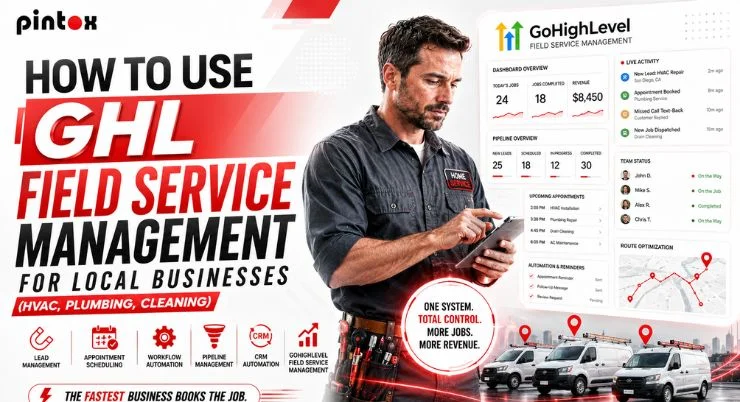
GoHighLevel can fix that with one connected system. You can capture leads, schedule jobs, automate follow-ups, and track outcomes. This guide shows a practical setup for HVAC, plumbing, and cleaning. You will also see real field service examples you can copy.
Start with fast lead response and simple pipeline rules. That alone can lift bookings in most USA markets.
GHL Field Service Management: Meaning, Core Workflow, And Why It Works
Field service management’s meaning is simple. It is how you manage work that happens at the customer’s location. It covers leads, scheduling, dispatch, job progress, and follow-up. For service-oriented businesses, it must run without constant babysitting.
GoHighLevel is not a full dispatch suite like ServiceTitan. But it can run most local operations with smart setup. It is strong for lead flow, appointment scheduling, and follow-up automation. It also helps with field service professionals’ management through visibility and ownership.
What field service management means for home service businesses
Local service work has three recurring problems. You need fast contact. You need clear status for every job. You need consistent reminders and follow-ups.
This is where GoHighLevel helps. It uses a unified contact database for every customer. Each contact record becomes your single source of truth. You can store service interests, notes, and job history.
The lead-to-job lifecycle inside GoHighLevel
Think in one simple flow. Lead comes in. You respond fast. You book the appointment. You track the opportunity. You follow up until you win or close it.
Inside GoHighLevel, that means:
- GoHighLevel lead management for new inquiries.
- GoHighLevel contact management for customer details.
- Pipeline management for job status.
- Appointment scheduling for booked work.
- Automation workflows for consistent follow-through.
Critical Capabilities Local Service Companies Need Before They Scale
Most local teams do not fail due to a lack of leads. They fail from weak systems. Before you scale, lock these basics.
These are the critical capabilities for field service management:
- Fast response for every new lead.
- Clear pipeline stages with rules.
- Reliable calendar sync across staff.
- Follow-up automation for quotes and no-shows.
- Simple reporting that drives decisions.
Field service planning matters too. You need capacity, time blocks, and clean handoffs. Otherwise, your calendar becomes chaos.
The non-negotiables (speed, visibility, consistency)
Speed wins in home services. Many buyers contact three companies. The first real response often gets the job. Visibility keeps your team aligned. Consistency protects your reputation. Lead response time for home service businesses is the simplest metric to improve first.
Where teams usually leak revenue
Revenue leaks often hide in small details. Jobs sit uncalled. Quotes go stale. Follow-ups stop after one message.
Watch for potential bottlenecks in your sales cycle. Then fix them with stage rules and alerts. This supports better revenue forecasts over time.
Set Up Your Contact Database And Segmentation For Service Calls
Your CRM is only useful if it stays clean. A centralized database of contacts prevents confusion. It also supports repeat jobs and upsells.
Start by building a solid GHL contact database. Keep it simple, then expand. Your goal is clarity, not complexity.
Build a centralized database of contacts that stays clean
Every contact record should include:
- Name, phone, email.
- Address details.
- Service interests like “AC repair” or “deep cleaning.”
- Key custom fields, like “home type” or “preferred days.”
- Tags for quick sorting.
Use tags for broad sorting. Use custom fields for data you want to filter later. Do not create fields you will not use. This structure supports smart segmentation. It also prevents duplicate records and missed context.
Segment leads by job type, urgency, and source
Lead segmentation helps you respond with the right message. It also helps your team prioritize urgent work.
Segment by:
- Job type.
- Zip code or service zone.
- Urgency.
- Campaign sources.
Track campaign sources and source reporting. Then check your CRM dashboard weekly. Over time, CRM analytics will show what actually converts. Dynamic groups can also help. Use them for lists like “Unbooked estimates” or “Past due follow-ups.”
Pipeline Management For HVAC, Plumbing, And Cleaning (From New Lead To Won)
A pipeline makes your day feel organized. Without one, leads vanish into texts and sticky notes. A pipeline also helps you coach staff.
You will track every opportunity from first contact to payment. This reduces stress and improves close rates.
Use a Kanban-based pipeline to track every opportunity
Use a Kanban-based pipeline with drag-and-drop pipeline movement. Each card is a job or estimate. Each column is a stage.
This improves opportunity tracking. It also makes handoffs easier between the office and the field.
Recommended stages you can copy (and what each stage means)
Keep stages clear and action-based. Here is a practical set most teams can use:
- New lead: just came in.
- Contacted: you reached them or left a message.
- Qualified leads: job fits your service area and budget.
- Proposal sent: estimate delivered.
- Scheduled: appointment booked.
- In progress: job active.
- Won: job completed and paid.
- Lost: job declined or inactive.
Use sales notifications when a card changes stages. This keeps your team accountable.
Example pipeline stages and required actions
Stage | Owner | SLA | Next action | Automation trigger |
| New lead | Office | 5 minutes | Call + SMS | Create task + text |
Contacted | Office | 2 hours | Offer times | Send booking link |
| Qualified leads | Manager | 24 hours | Send estimate | Proposal follow-up |
Proposal sent | Sales | 48 hours | Check-in | Quote nurture |
| Scheduled | Office | 24 hours pre | Confirm | Reminder messages |
Won | Office | 2 hours post | Review request | Review workflow |
Appointment Scheduling And Calendar Sync That Prevents No-Shows
Scheduling is where many teams lose margin. No-shows waste time and fuel. Double-booking creates angry customers.
GoHighLevel can handle booking appointments with simple rules. You can also send reminders automatically.
Scheduling flows that work for local service jobs
Use appointment scheduling that matches your job type. HVAC and plumbing often need time buffers. Cleaning often needs repeat bookings and team assignment.
Use reminders to reduce no-shows. Use reminder messages at key times:
- Immediately after booking.
- 24 hours before.
- 2 hours before.
Also, add an easy reschedule option. That saves the job when plans change. It also protects your schedule.
Calendar sync setup choices and what to use when
Calendar sync prevents double-booking across staff. Use Google Calendar sync for most teams. Use Outlook calendar sync for office-heavy businesses.
If you run route-based days, plan blocks. That is basic field service planning. It reduces travel and improves tech utilization. GoHighLevel field service features make this easier by keeping scheduling, reminders, and contact data in one place.
Automations That Turn Missed Calls Into Booked Jobs
Automation is where GoHighLevel shines. It reduces manual work and keeps leads warm. It also improves response speed.
The goal is simple. Every lead gets a fast reply. Every quote gets a follow-up. Every customer gets consistent communication.
The 5-minute follow-up system (SLA + scripts)
Build a five-minute SLA for new leads. Use two-way SMS, calls, and email automation. Also, keep voice messages ready for missed calls.
A basic flow can look like this:
- Instant SMS reply with a question.
- Task created for a call.
- If no answer, send a second SMS.
- If still no reply, send an email.
Add sales notifications to alert the owner. This keeps leads from sitting unnoticed.
Nurture sequences for estimates, reschedules, and seasonal service
Lead nurturing matters in home services. Many people delay decisions. Your system should stay polite and consistent.
Use follow-up automation for:
- Unanswered estimates.
- No-shows.
- Seasonal offers.
- Maintenance plans.
Use omnichannel communication when it helps. Mix SMS and email based on customer preference. Add DMs only if your audience uses them.
Automation triggers and what they should do
Trigger | Tags / Custom fields | Message type | Next pipeline move |
| New lead created | Job type tag | SMS + task | New lead > Contacted |
Missed call | “Missed-call” tag | SMS | Stay in contact |
| Estimate sent | Proposal value field | SMS + email | Qualified > Proposal sent |
Appointment booked | Calendar sync | SMS + email | Proposal sent > Scheduled |
| Job marked won | Service interests | Review request | Won |
Track Jobs, Owners, And Results With Reporting That Actually Helps
Most reports are ignored because they are confusing. You only need a few metrics each week. Then take action.
Start with your CRM dashboard. Use CRM analytics to answer simple questions.
- Which sources bring real jobs?
- Which stage leaks the most?
What to track weekly (and why it matters)
Track these weekly:
- Response time to new leads.
- Booking rate by source.
- Stage conversion rate.
- No-show rate.
- Close rate after proposal sent.
This supports better revenue forecasts. It also highlights what to fix first.
Find and fix bottlenecks fast
Look for potential bottlenecks in opportunity tracking.
- Do leads stall after being contacted?
- Do proposals sit too long?
Fix the stage rules and follow-up timing.
Field Service Management Best Practices You Can Apply Inside GHL
Generic advice is not enough. You need field service management best practices that you can execute. These field service best practices work well inside GoHighLevel.
They also support service management best practices. And they improve field service operations’ best practices.
Best practices for dispatch, follow-up, and customer experience
Use these practices consistently:
- Confirm every appointment the same day.
- Send reminder messages before arrival.
- Send “on the way” texts when possible.
- Follow up after service with a clear next step.
- Ask for reviews when the customer is happiest.
These small steps lift trust fast. They also reduce cancellations.
Best practices for pipeline hygiene and lead quality
Keep your pipeline clean. A messy pipeline destroys visibility.
Do this weekly:
- Close old leads as lost.
- Update stages after each contact.
- Use tags to mark job type.
- Use lead scoring for priority leads.
Lead scoring helps when volume increases. It also supports smarter follow-up.
Best practices for teams and accountability
Field service professionals’ management is easier with clear rules. Assign owners per stage. Use sales notifications for handoffs. Keep expectations simple and visible.
Common Setup Mistakes (And Quick Fixes) For Small Service Businesses
Most issues come from overbuilding. Too many fields create confusion. Too many stages slow action.
Mistakes that kill conversions
Watch for these mistakes:
- Slow follow-up after a new lead.
- No clear pipeline ownership.
- Unused custom fields everywhere.
- No reminders for scheduled jobs.
- No follow-up after proposal sent.
Quick fixes you can implement today
Start with simple fixes:
- Clean tags and remove duplicates.
- Keep one pipeline per service line.
- Set reminders for every appointment.
- Add a missed-call text flow.
- Use a weekly pipeline review habit.
Not sure where your setup leaks leads? We can run a quick audit and give next steps.
When To DIY vs Hire Help For Your GoHighLevel Setup
DIY can work for small teams. It works best when your process is simple. It also works when you have time to test. Get help when the system must be reliable and fast. Or when you have multiple staff and calendars. Or when you want stronger attribution and reporting. How to use GoHighLevel for local businesses comes down to building a simple lead-to-booking flow first, then adding automation and reporting.
FAQ’s: GoHighLevel Field Service Workflows For HVAC, Plumbing, And Cleaning
What Is GHL Field Service Management?
It is using GoHighLevel to manage leads, bookings, follow-ups, and job tracking. It supports home service workflows without scattered tools.
How Can GoHighLevel Help HVAC, Plumbing, And Cleaning Businesses?
It centralizes contacts, tracks jobs in a pipeline, and automates reminders. It also improves visibility across office and field staff.
Can GHL Manage Field Service Leads And Appointments?
Yes. It captures leads, assigns them, and connects them to appointment scheduling. It also tracks outcomes through pipeline stages.
How Does GHL Help Local Service Businesses Track Jobs?
Jobs move through a Kanban-style pipeline with clear stages. Each opportunity stays tied to the same contact record.
Can GoHighLevel Automate Follow-Ups For Field Service Customers?
Yes. You can automate SMS and email based on lead status or booking events. This keeps follow-up consistent.
How Can GHL Pipelines Help Manage HVAC Or Plumbing Leads?
Pipelines show every job stage, owner, and next action. They reduce missed calls and stalled estimates.
Does GoHighLevel Support Appointment Scheduling For Service Businesses?
Yes. You can set availability, add buffers, and route bookings by calendar rules. Calendar sync prevents double-booking.
Can GHL Send SMS And Email Reminders To Customers?
Yes. You can send reminder messages before appointments and after service. This reduces no-shows and boosts reviews.
How Does GoHighLevel Improve Lead Response Time For Local Businesses?
It can reply instantly with two-way SMS and create call tasks. This supports fast contact and higher booking rates.
Is GoHighLevel Good For Small Field Service Businesses?
Yes, if you want one system for CRM, follow-up, and scheduling. Start simple, then expand as volume grows.
Build A Simple Lead-To-Job System That Books More Work
You do not need a complicated tech stack to grow. You need speed, visibility, and consistent follow-through. GoHighLevel can deliver that when it is set up well.
Start with a clean contact database. Add smart segmentation, a clear pipeline, and appointment scheduling. Then automate follow-ups and track results weekly.
If you want a reliable setup built around your workflow, book a call or explore our GoHighLevel services. You will get a clear plan, not vague advice.