Working on an enterprise level with various services might sound amazing until you start dealing with some operational issues. Some people are working on building websites, some are managing the SEO of their customers, and one person is trying to keep track of their leads from a spreadsheet that hasn’t been updated for three days. At that point, even strong businesses begin losing visibility over their sales process.
This is where a properly structured GoHighLevel Pipeline becomes far more than just a CRM feature. It becomes the operational backbone of the business.
In the case of multi-services, the pipeline structure is essential for the lead response time process, follow-ups, onboarding, internal communications, and eventually revenue generation. The absence of structured crm pipelines in businesses may result in stagnating leads, lack of nurture prospects, lost leads, and non-related workflows.
At Pintox, we’ve worked with businesses that initially believed their biggest issue was lead generation, only to realize the real problem was poor pipeline management. Once their workflows, opportunity stages, and automation systems were properly structured inside GoHighLevel, their sales operations became significantly more organized and scalable.
This guide breaks down how businesses can structure a scalable GoHighLevel Pipeline while keeping the system clean, efficient, and easy for teams to manage daily.
Why Pipeline Structure Matters More for Multi-Service Businesses
Businesses offering one service can usually survive with a basic sales workflow. But once multiple services enter the picture, things start becoming more complex very quickly.
A lead interested in SEO follows a very different customer journey compared to someone looking for a website redesign or CRM automation setup. Some services require consultations and proposal creation, while others move directly into onboarding. Certain deals close within days, while larger projects may take weeks of discussions before reaching a winning stage.
Without organized pipeline stages, businesses often run into problems like:
- stale opportunities sitting untouched for weeks
- Poor lead qualification
- inconsistent follow-ups
- confusing opportunity dashboards
- weak visibility across departments
A well-planned sales pipeline helps businesses avoid these issues by creating a clear structure around every lead and every service workflow.
More importantly, it creates clarity for the entire team. When someone opens the pipeline dashboard, they should instantly understand:
- where the lead currently stands
- What action is needed next
- which service the prospect is interested in
- Who is responsible for the opportunity
That level of visibility becomes critical as businesses scale.
Start by Understanding Your Customer Journey
Before creating any crm pipelines, businesses need to step back and understand how their customer journey actually works.
One of the biggest mistakes companies make is jumping straight into GHL automation tips for pipeline management without mapping their real sales process first.
For example, a digital marketing agency may offer:
- SEO services
- Google Ads management
- Website development
- CRM automation
- Social media marketing
At first glance, it may seem easier to place all leads inside one shared ghl pipeline. But the reality is that each service often has different timelines, sales conversations, onboarding requirements, and opportunity stages.
A website project may require:
- discovery calls
- design approvals
- proposal revisions
- onboarding meetings
Meanwhile, an SEO lead may move through:
- lead acquisition
- audit presentation
- strategy proposal
- monthly retainer onboarding
The customer journey itself should determine how your GoHighLevel Pipeline is structured. This approach creates cleaner service workflows and better pipeline dashboard visibility over time.
Separate Pipelines vs Shared Pipelines
This is one of the most common questions businesses ask while setting up GoHighLevel.
Should every service have its own pipeline?
The answer depends entirely on how your business operates internally.
Businesses with completely different departments and sales processes usually benefit from separate opportunity pipeline structures. For example, an agency handling both web development and paid advertising may prefer independent pipelines because each service has unique timelines, onboarding procedures, and sales workflows.
In this case, separate pipelines improve:
- dashboard data clarity
- opportunity dashboards
- reporting accuracy
- pipeline status tracking
However, not every business needs multiple pipelines immediately.
Some companies operate more efficiently using one shared sales pipeline with tags, lead scoring, and custom fields separating services internally. This keeps reporting centralized while still allowing businesses to manage leads properly. A shared structure might include stages like:
- New Lead
- Initial Contact
- Discovery Call
- Proposal Sent
- Follow-Up
- Closed Won
- Closed Lost
Then businesses can organize leads further using:
- custom fields
- lead source tracking
- service tags
- opportunity value filters
The goal is not to create the most advanced system possible. The goal is to create a GoHighLevel Pipeline that your team can consistently use without confusion.
Build Pipeline Stages Around Real Actions
One reason many pipelines fail is that the stage names themselves are unclear. Businesses often create vague opportunity stages, like:
- pending
- processing
- internal review
- stage 2
The problem is that nobody fully understands what those stages actually mean. Strong pipeline stages should reflect clear customer movement.
For example:
- New Inquiry
- Consultation Scheduled
- Proposal Sent
- Awaiting Approval
- Payment Received
- Service Started
These stages instantly improve:
- opportunity dashboard clarity
- sales workflows
- team accountability
- lead management consistency
When teams understand the exact meaning behind every stage name, updating the GHL pipeline becomes significantly easier.
It also improves pipeline dashboard visibility for management teams reviewing opportunities daily.
Keep Your Pipeline Simpler Than You Think
Many businesses assume detailed systems require dozens of stages. In reality, overcomplicated pipelines usually create more stale opportunities than organized workflows.
A pipeline with 18 stages often becomes difficult to maintain consistently. Team members stop updating opportunities properly, dashboards become cluttered, and visibility starts disappearing again.
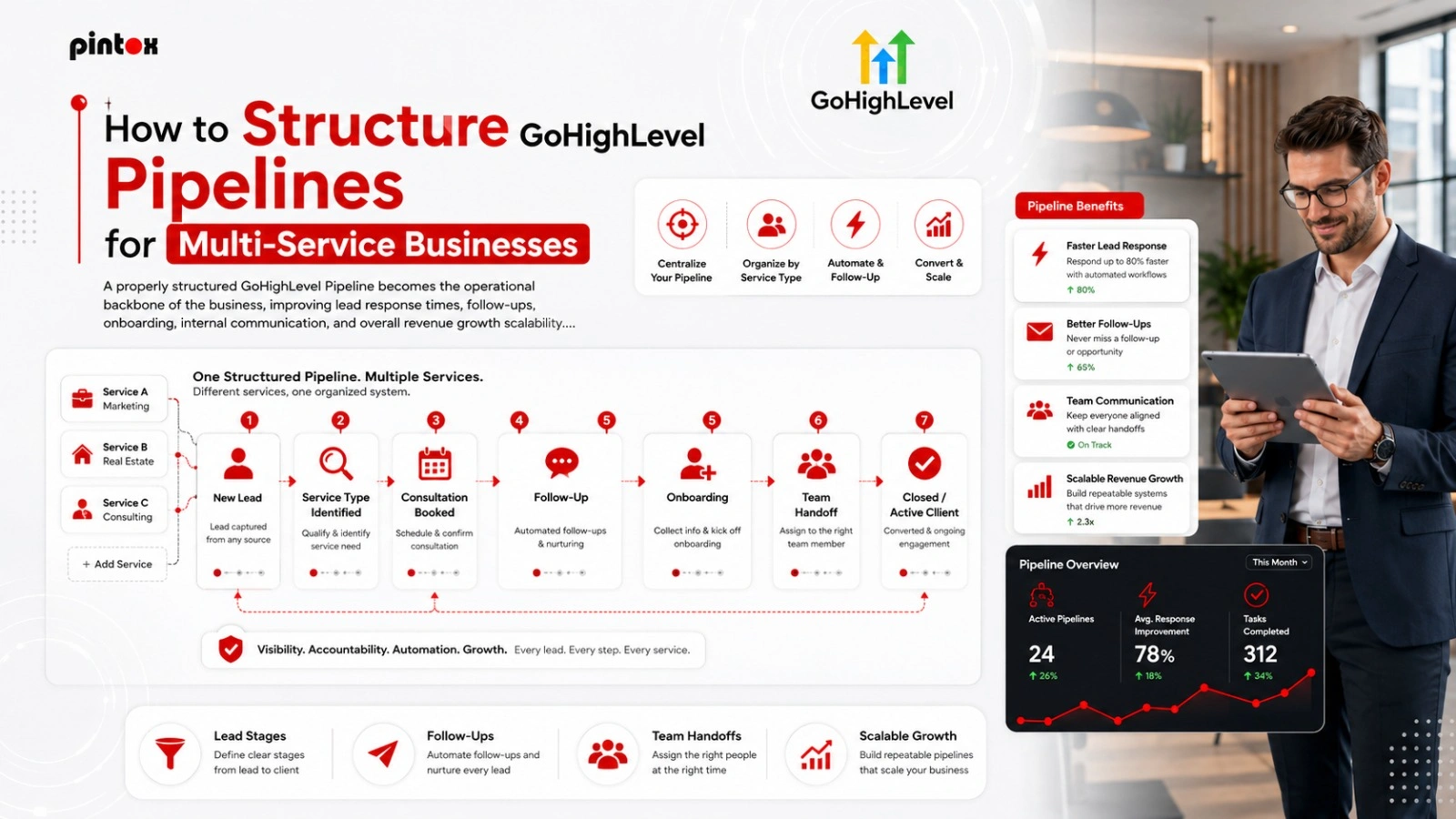
Most businesses perform better with 5–8 strong opportunity stages. For example, a clean GoHighLevel Pipeline for a service business may simply look like this:
Example Pipeline Structure
New Lead
A lead enters through forms, referrals, paid ads, or lead capture funnels.
Contacted
The sales team successfully made initial contact.
Discovery Call Scheduled
The prospect booked a consultation or strategy session.
Proposal Sent
Proposal creation is completed, and pricing is shared.
Follow-Up
The prospect is reviewing options or discussing revisions.
Closed Won
The deal closes, and onboarding begins.
Closed Lost
The lead decides not to move forward.
This structure feels simple, but it provides enough visibility to manage leads effectively without creating unnecessary friction.
Workflow Automation Changes Everything
One of the biggest advantages of GoHighLevel is its ability to automate repetitive sales and operational tasks.
Without proper workflow automation, businesses often rely heavily on manual follow-ups, manual lead assignment, and internal reminders that eventually become inconsistent. This is where pipeline automation becomes incredibly valuable.
Imagine a prospect submits a form requesting SEO services. Instead of manually reviewing and assigning the lead, the system automatically:
- creates an opportunity
- assigns the correct sales rep
- adds service tags
- updates the pipeline level
- sends a follow-up email
- schedules reminders
Now compare that to businesses manually sorting leads through spreadsheets or inboxes. The difference in efficiency becomes massive over time.
At Pintox, businesses often request CRM automation systems after realizing how much time their teams lose handling repetitive tasks manually every single day.
Use Custom Fields to Improve Organization
As businesses grow, simple lead tracking is no longer enough. Teams need deeper visibility into:
- budget range
- lead source
- service interest
- timeline expectations
- opportunity value
- onboarding requirements
This is where custom fields become essential inside a GoHighLevel Pipeline. For example, an agency may want to track:
- monthly ad spend
- preferred launch date
- business size
- requested services
- estimated monetary value
Once properly organized, businesses gain cleaner dashboard data and better opportunity dashboards across departments.
Custom fields also improve lead nurturing because teams can personalize communication based on actual customer information instead of generic follow-ups.
Department-Based Pipelines Help Larger Teams
As businesses scale, many eventually separate workflows by department rather than by service. This approach creates cleaner business workflows overall.
Sales Pipeline
Handles lead acquisition and lead qualification.
Onboarding Pipeline
Handles signed clients entering fulfillment.
Support Pipeline
Handles existing customer requests and ticket management.
Renewal Pipeline
Handles upsells and recurring contracts.
Instead of forcing every team into one overloaded sales pipeline, each department gets a structure designed around their actual responsibilities.
This improves:
- pipeline dashboard visibility
- opportunity cards organization
- customer journey tracking
- sales process clarity
- Reporting Helps Businesses Identify Bottlenecks
The real value of structured pipeline management is not just organization. It is visibility. A properly built GoHighLevel Pipeline helps businesses identify exactly where opportunities slow down.
For example:
- Are proposals sitting too long?
- Are consultations converting poorly?
- Are onboarding delays affecting close rates?
- Are high-value leads getting ignored?
This level of insight helps businesses improve operational performance using real dashboard data instead of assumptions.
One agency discovered its close rate improved dramatically when consultations were booked within 24 hours of lead capture. Without pipeline tracking and reporting, they would never have identified that issue.
Team Adoption Matters More Than Complexity
Even the most advanced GoHighLevel crm pipelines fail if the team does not use them consistently. Every sales rep should understand:
- How to add opportunity details
- When to update stages
- How pipeline automation works
- What each stage represents
- How to manage leads correctly
Consistency always matters more than advanced features. A simple but consistently updated GoHighLevel Pipeline will always outperform a complicated system nobody maintains properly.
Frequently Asked Questions
What is a GoHighLevel Pipeline?
A GoHighLevel Pipeline is a visual sales system that helps businesses organize leads, track opportunity stages, and manage the entire customer journey more efficiently.
Should businesses create separate crm pipelines for each service?
Only if services have significantly different sales workflows or onboarding processes, otherwise, shared pipelines with tags and custom fields often work effectively.
How many pipeline stages should a business have?
Most businesses perform best with around 5–8 clear pipeline stages that reflect real customer movement.
Why is workflow automation important in GoHighLevel?
Workflow automation reduces manual tasks like lead assignment, follow-ups, onboarding reminders, and pipeline updates, improving operational efficiency.
What are custom fields used for?
Custom fields help businesses organize information like budget range, lead source, opportunity value, timeline expectations, and service preferences.
How does pipeline reporting help businesses?
Pipeline reporting improves visibility by helping businesses identify stalled leads, weak follow-ups, delayed onboarding, and other operational bottlenecks.
Can one sales pipeline manage multiple services?
Yes. Many businesses successfully use one shared sales pipeline while organizing services through tags, lead scoring, and custom fields.
Effective Pipeline Structure Means Effective Operations
A correctly organized GoHighLevel pipeline will change everything about how lead management, onboarding, automation, and customer operations happen within multi-service companies.
By having a well-organized system and not depending on scattered information in spreadsheets and difficult to follow follow-up processes, companies have an opportunity to organize everything in the most efficient way possible.
There are no complicated pipelines that work. There are only pipelines that are simple to understand and easy to work on.
- Start with a clean structure.
- Build around the real customer journey.
- Use workflow automation strategically.
- Improve your pipeline management gradually as the business grows.
That approach creates scalable systems capable of supporting long-term business growth without operational chaos.
Need Help Structuring Your GoHighLevel Pipeline?
At Pintox, we help agencies and service businesses build customized GoHighLevel systems designed around real operational workflows. From GoHighLevel CRM automation and pipeline automation to onboarding systems and sales workflow optimization, our team helps businesses create scalable processes that improve visibility, efficiency, and long-term growth.