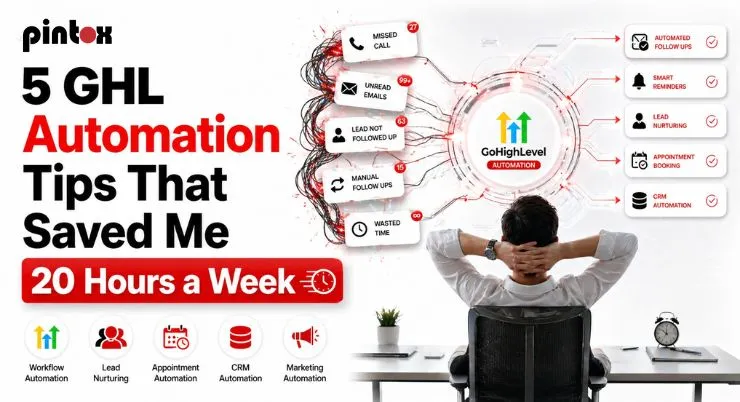
“20 hours back every week. I didn’t hire anyone. I automated.”
That’s not a clickbait headline. That’s what actually happened.
I was deep in it, leads piling up, follow-ups getting missed, appointments being no-shows, and past clients going completely cold. I was doing the same manual tasks every single day. Copying and pasting. Sending the same emails. Checking the same CRM fields. Reminding people about the same appointments.
It was exhausting. And it wasn’t growing anything.
The turning point? I stopped trying to do more and started using automation tips to build systems that did the work for me inside GoHighLevel.
If you’re an agency owner or a local business owner drowning in repetitive tasks, this is for you. These aren’t theories. These are real GoHighLevel automations I set up and still use every week. Each one took less than an hour to build and has paid back hundreds of hours since.
Let’s break them all down hack by hack.
Hack #1: Stop Chasing New Leads: Make Your CRM Chase Them First
Here’s a brutal truth: if you don’t respond to a new lead within 5 minutes, you’ve probably already lost them.
Studies show that the odds of qualifying a lead drop by over 80% after the first 5 minutes of inactivity. Most businesses respond within hours. Some in days.
This is where GoHighLevel automation completely changes the game. It helps you improve your lead response time.
The hack: set up an instant lead response workflow that fires the second someone fills out your form, clicks your ad, or sends you a DM. No delay. No manual work.
Here’s how to set it up:
- Go to your GHL dashboard? Automation? Workflows
- Create a new workflow with the trigger “Contact Created” or “Form Submitted.”
- Add an action: Send SMS, something short like “Hey [First Name]!” ” Thanks for reaching out. We’ll be in touch in the next few minutes. Want to grab a quick call?”
- Add a second action: Send Email, slightly longer, branded, with a CTA to book a call
- Add a third action: Assign to a pipeline stage automatically
That’s it. The moment a lead comes in, they get a message. While your competitors are still sipping their coffee, your CRM has already started the conversation.
This single GoHighLevel automation workflow eliminated at least 3–4 hours of manual lead follow-up from my week. And the reply rates? Way higher than anything I was doing manually.
Hack #2: Build a Follow-Up Sequence That Never Gives Up (So You Don’t Have To)
Most leads don’t convert on the first touch. Or the second. Or the third. And most business owners give up way before the lead is actually ready to buy.
The fix? An automated follow-up sequence that keeps showing up without you lifting a finger.
This is one of the most powerful GHL automations you can build, and it works beautifully for GoHighLevel lead nurturing automation and local business workflows, from dental clinics to real estate agents to marketing agencies.
The sequence I use:
- Day 0: Instant SMS + Email (covered in Hack #1)
- Day 1: Follow-up SMS, casual check-in, keep it human
- Day 3: Value email, a tip, a case study, or a short video
- Day 5: SMS with a soft CTA, “Still interested? Here’s my calendar link.”
- Day 10: Final email, create urgency, but don’t be pushy
- Day 14: Last SMS, re-engage or archive
You set this up once. It runs forever. Every new lead gets the same polished, persistent follow-up experience, whether you’re asleep, on vacation, or with another client.
This is what automation GHL is built for. And when you pair it with the GHL Automation features properly, the whole thing becomes hands-free.
Email automation tips for this sequence:
- Keep subject lines under 6 words
- Personalize with the contact’s first name
- Don’t sell in every email. Nurture first
- Test plain text vs. designed emails. Plain text often wins for reply rates
These are also solid email automation tips that work across any platform, but inside GHL, they’re turbocharged because your SMS and email live in the same workflow.
Hack #3: Appointment Reminders That Actually Cut Your No-Show Rate in Half
No-shows are expensive. Not just the lost revenue, but the wasted time slot, the rescheduling hassle, and the mental energy of following up.
Before I set this up, my no-show rate was around 30%. After? Under 10%.
The hack is a simple but powerful appointment reminder sequence built inside GHL’s workflow builder.
Here’s the full sequence:
- Immediately after booking: Confirmation SMS + Email with appointment details and a calendar file
- 24 hours before: Reminder SMS. “Hey [Name], just a reminder about tomorrow at [Time]. Reply YES to confirm or let us know if you need to reschedule.”
- 2 hours before: Final reminder SMS. Short and punchy
- If no confirmation: Trigger a separate workflow that flags the contact for a manual check-in
The beauty of this is in the conditional logic. You can tell GHL: “If the contact replies YES, remove them from the reminder sequence.” So they’re not getting spammed if they’ve already confirmed.
This is one of the high-level marketing automation features that most people overlook because it seems simple, but the ROI is massive. One saved appointment per week at even $500 value = $26,000 a year. From a workflow you built in 45 minutes.
For businesses worried about GoHighLevel stability and efficiency concerns, this is actually one of the most reliable workflows in the platform. It’s lightweight, it’s battle-tested, and it just works.
Hack #4: Reactivate Your Dead Leads: They’re Worth Way More Than You Think
You already have gold in your CRM. You just haven’t dug it out yet.
Database reactivation is one of the most underrated automation hacks in the marketing world. The idea is simple: take all your old, cold, or unresponsive leads: the ones you gave up on months ago, and run them through an automated re-engagement sequence.
Here’s why this is such a powerful growth hacking automation move: these people already know you. They raised their hand at some point. Life got in the way. But they’re still in your database, and the cost to re-engage them is almost zero compared to running ads for new leads.
How to set it up in GHL:
Filter your contacts: “Last activity more than 60 days ago” + “Not a paying client” + “Lead status = Cold.”
Create a workflow with a manual trigger (so you can review before launching)
Sequence:
- Message 1 (SMS): “Hey [Name], it’s been a while! We’ve had some changes, and I’m reaching out personally. Are you still looking for [service]?”
- Message 2 (Email, Day 3): A short story or win. “Here’s what a client just achieved with us in 30 days.”
- Message 3 (SMS, Day 7): A direct offer or a free resource
- Message 4 (Email, Day 10): Final check-in with urgency
This falls perfectly under GoHighLevel CRM marketing automation: using your CRM data intelligently to generate revenue without new ad spend.
The team at Pintox Digital has run this for clients across multiple industries, and the results are consistently wild. One agency reactivated 11 closed leads from a 6-month-old database in the first week alone.
One thing to watch: this is also where marketing automation hacks can go wrong if you’re not careful with your messaging. Keep it personal, keep it human, and don’t sound like a robot.
Hack #5: Get More 5-Star Reviews and Referrals on Autopilot, the Best Remaining Automation Tips for Local Business Growth
Most businesses ask for reviews occasionally. Some ask awkwardly. Most forget to ask at all.
What if every happy client automatically got a review request at exactly the right moment, and if they were super happy, also got nudged to refer a friend?
This is one of the best marketing automation tips for local businesses, and it’s shockingly underused.
The review request workflow:
- Trigger: Contact moves to “Job Complete” or “Service Delivered” stage in your pipeline
- Wait: 2 hours (let the positive experience settle)
- Action 1: Send SMS, “Hey [Name]! We’re so glad we could help. Would you mind leaving us a quick Google review? It takes 30 seconds and means the world to us: [link].”
- Action 2 (If no response after 48 hours): Send an email follow-up with the same ask, slightly reworded
- Action 3 (If they click the link): Move to “Review Requested” tag
The referral system add-on:
- Wait 3 days after the review request
- Send SMS: “We’d love to help someone you know. If you refer a friend and they sign up, we’ll send you [incentive]. Just reply with their name or shoot them this link.”
This is exactly the kind of business automation tip that doesn’t just save time; it actively generates revenue.
For the full picture on how to use GoHighLevel Workflow AI to make your review and referral workflows even smarter, it’s worth reading how agencies are doing this at scale.
A few more automation tips for keeping your workflows in shape:
Just like with industrial automation maintenance tips, the goal is to build it right, then maintain it. Check your workflows monthly. Look at open rates, reply rates, and conversion. Update messaging that’s gone stale. GHL makes this easy with its reporting dashboard.
And for anyone wondering about tips for selecting procurement automation tools or how to pick the right GHL setup, this applies here, too. Don’t try to automate everything at once. Start with these 5, get them working, then layer in more complexity. The simplest workflows are usually the highest-performing ones.
Putting It All Together
Here’s the full picture of what these 5 GHL automation hacks do for your week:
Hack | What It Replaces | Time Saved Per Week |
| Instant Lead Response | Manual lead follow-up | 3–4 hours |
Follow-Up Sequences | Chase-up emails and texts | 4–5 hours |
| Appointment Reminders | Manual reminder calls | 2–3 hours |
Database Reactivation | Cold lead outreach | 4–5 hours |
| Reviews + Referrals | Asking manually, forgetting | 3–4 hours |
Total | ~17–21 hours/week |
That’s not exaggerated. That’s what automation GHL actually does when you implement it properly.
The whole setup, that is, all 5 workflows, takes a weekend. Maybe less. And once it’s running, it’s running.
If you’re ready to go deeper, Pintox Digital has built these exact systems for agencies and local businesses across the board. Start with setting up GHL to connect it with your existing channels, and you’ll be live before the week is out.
Frequently Asked Questions
What is GHL automation, and how does it save time?
GHL (GoHighLevel) automation lets you build workflows that automatically send messages, move leads through pipelines, assign tasks, and follow up with contacts, without any manual action. You build the workflow once, and it runs continuously, handling the repetitive tasks that would otherwise eat hours of your day.
What are the best GoHighLevel automations for agencies?
The top-performing ones for agencies are instant lead response, multi-step follow-up sequences, appointment reminders, database reactivation campaigns, and review/referral requests. These cover the full client journey and save the most time.
How do I automate repetitive tasks in GoHighLevel?
Go to Automations? Workflows in your GHL dashboard. Set a trigger (like a form submission or pipeline stage change), then add actions (send SMS, send email, add tag, assign to user, etc.). You can chain as many actions as you need with wait steps in between.
Which GHL workflows save the most time for business owners?
Follow-up sequences and appointment reminders consistently save the most time because they replace tasks that need to happen multiple times per lead. Reactivation campaigns also have a huge ROI because they work on your existing database.
How can GoHighLevel automation improve lead response time?
By using the “Contact Created” or “Form Submitted” trigger, you can fire an SMS and email within seconds of a new lead entering your system, even if you’re asleep or with another client. Speed-to-lead is one of the biggest factors in conversion, and GHL makes it automatic.
Can GoHighLevel automate lead follow-ups?
Yes, this is one of GHL’s strongest features. You can build multi-day, multi-channel follow-up sequences using SMS, email, voicemail drops, and even Facebook Messenger, all from a single workflow.
How do I set up automation workflows in GHL?
Start with a trigger (what starts the workflow), add your actions (what happens next), and use Wait steps to control timing. For more detailed guidance, check out setting up GHL.
What are the best SMS and email automations in GoHighLevel?
Instant lead response (SMS within 60 seconds of inquiry), appointment reminders (24-hour and 2-hour reminders), and re-engagement messages for cold contacts are consistently the highest-performing. Keep SMS under 160 characters and personalized with the contact’s first name.
Can GoHighLevel automate appointment reminders and follow-ups?
Absolutely. Using the appointment trigger and conditional logic, GHL can send reminders, ask for confirmation, and remove the contact from the reminder sequence once they’ve replied completely automatically.
What mistakes should I avoid when building GoHighLevel automations?
The biggest ones: not using conditional branches (so everyone gets the same message regardless of behavior), making sequences too long or too aggressive, not testing before going live, and forgetting to update workflows when your offers or messaging change. Keep your automations human-sounding, and audit them monthly.
Final Word
Want to skip the setup and get these workflows running this week? Pintox Digital specializes in GoHighLevel Automation, from simple lead response bots to full-stack agency automations. Book a call and let’s build it together.